
Web Application
CIS Inventory & Financial Management
Redesigning the Enterprise Financial &Inventory Management Experience
A comprehensive UX redesign initiative focused on streamlining financial operations, inventory management, and spend optimization for enterprise clients worldwide.
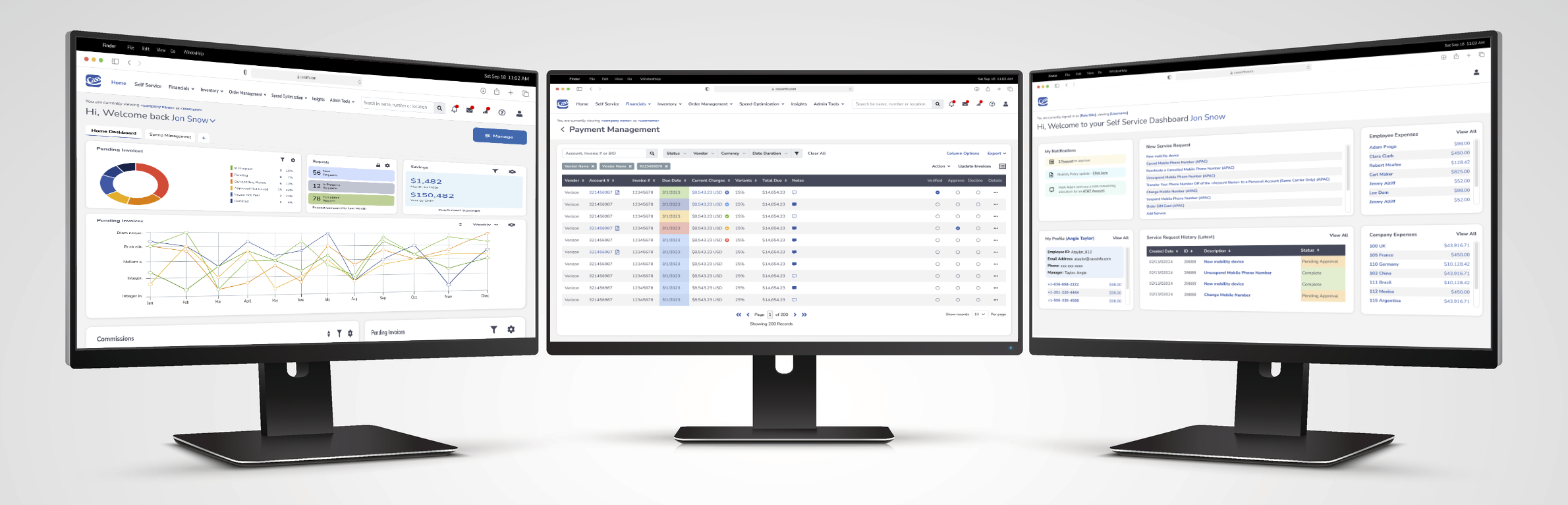
Project Overview
About Cass
Cass Information Systems is a leading provider of payment and information services, helping organizations manage and control expenses across telecommunications, utilities, and transportation. The platform serves thousands of enterprise clients globally, processing billions of dollars in transactions annually.
The Challenge
The existing system suffered from fragmented workflows, inconsistent UI patterns, and poor information hierarchy — making it difficult for financial managers, procurement teams, and administrators to efficiently manage inventory and financial data.
Project Scope
- End-to-end UX redesign of 6 core modules
- Unified design system and component library
- Improved data discoverability and workflow efficiency
- Role-based dashboard personalization
The UX Design Process
A Structured, Iterative Methodology
Discover
Activities
Stakeholder interviews, user surveys, analytics review
Outcome
Problem definition & user personas
Define
Activities
Journey mapping, pain point analysis, prioritization
Outcome
Design principles & success metrics
Design
Activities
Wireframing, prototyping, design system creation
Outcome
High-fidelity mockups
Validate
Activities
Usability testing, A/B testing, stakeholder reviews
Outcome
Refined final designs
Deliver
Activities
Developer handoff, documentation, QA support
Outcome
Production-ready specs
User Research Insights
Pain Points Drove the Redesign
Interviews with 24 enterprise users across finance, procurement, and IT
- Cognitive Overload
Users struggled to locate relevant data across disconnected modules with no unified search or contextual navigation. - Approval Bottlenecks
Invoice approval workflows required 5–7 manual steps with no inline status visibility. - Limited Data Visibility
Spend analytics were buried in static reports, preventing proactive decision-making. - Role Confusion
The interface did not adapt to different user roles, exposing irrelevant features and creating noise.
Design Principles
- Clarity over density
- Consistent interaction patterns
- Role-aware personalization
- Actionable insights
Home Dashboard
Personalized Command Center for Every User
Design Goal
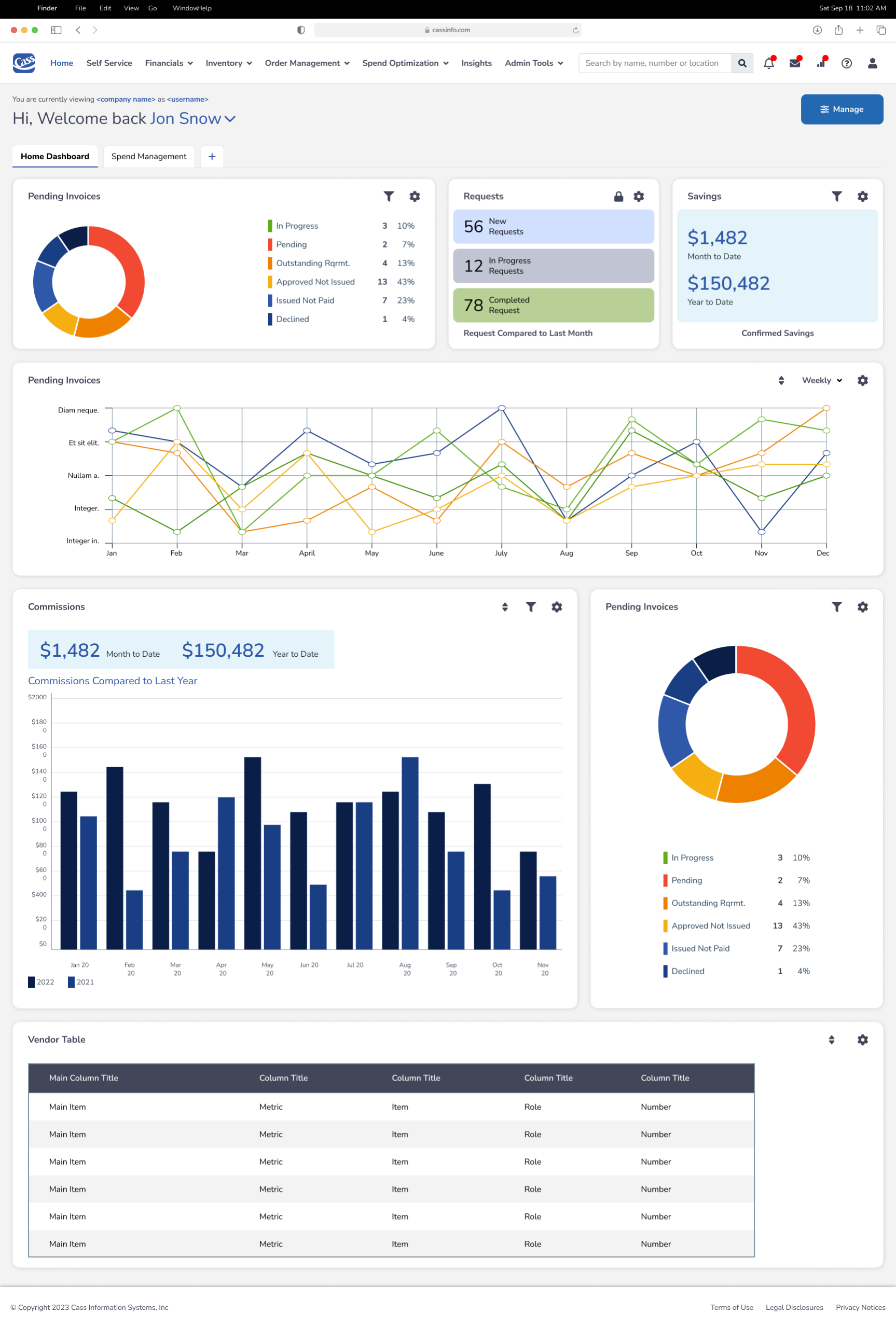
Give users an at-a-glance view of their most critical financial KPIs, pending actions, and spend trends — all in one personalized workspace.
Key UX Decisions
- Modular widget layout allows users to customize their dashboard with the “Manage” control, supporting different roles.
- Donut chart for invoice status provides instant categorical breakdown without requiring drill-down.
- Dual-axis line chart for pending invoices tracks weekly trends across multiple vendor categories simultaneously.
- Commissions bar chart enables year-over-year comparison at a glance.
- Requests widget surfaces new, in-progress, and completed requests with color-coded status cards.
Outcome
Reduced time-to-insight from an average of 4 minutes to under 30 seconds in usability testing.
Self-Service Dashboard
Empowering End Users with Autonomy
Design Goal
Enable individual employees to manage their own service requests, expenses, and profile data without requiring IT or admin intervention.
Key UX Decisions
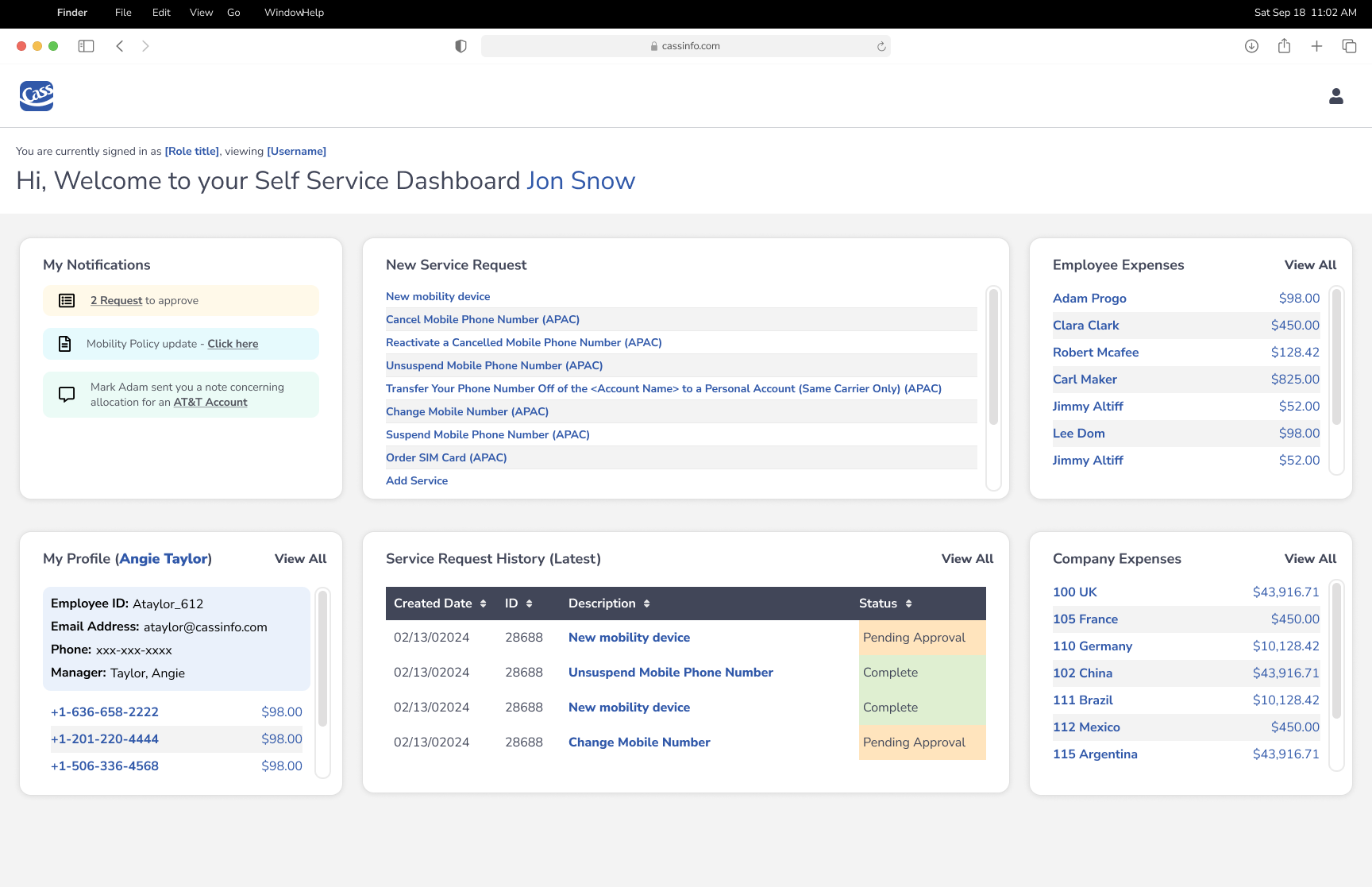
- Personalized greeting establishes user context and role awareness immediately.
- My Notifications panel surfaces pending approvals and policy updates with direct action links.
- New Service Request panel provides a scannable list of available actions with clear regional labeling.
- Employee & Company Expenses widgets display financial summaries with “View All” drill-through navigation.
- Service Request History table shows recent requests with color-coded status.
Outcome
Self-service adoption increased by 40%
Inventory Management
Full Visibility Across Enterprise Assets
Design Goal
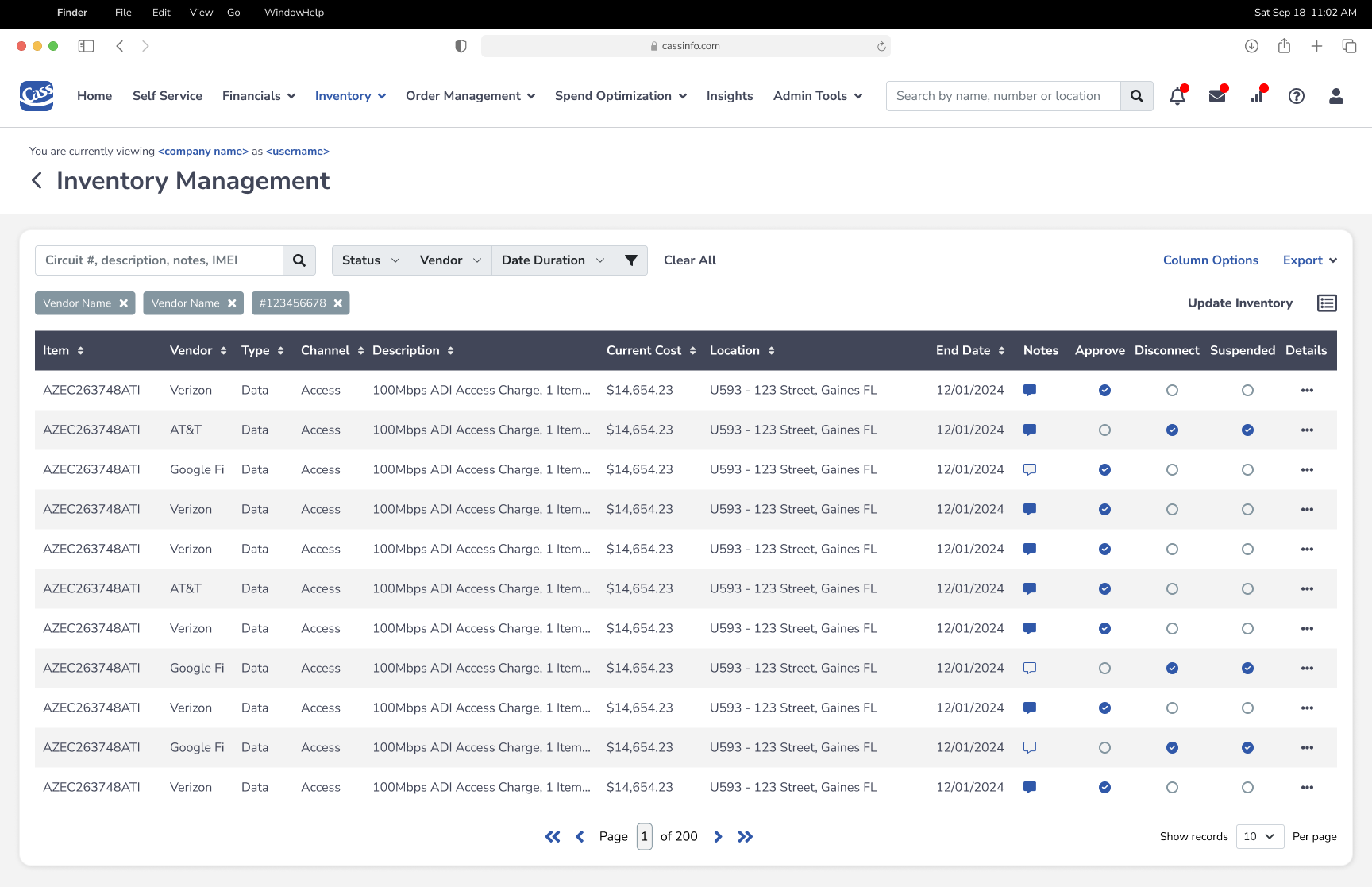
Provide procurement and IT teams with a unified, filterable view of all inventory items — circuits, devices, and services — with inline action capabilities.
Key UX Decisions
- Persistent filter bar & active filter chips keep search context visible
- Column-level sortability supports power-user workflows
- Inline action columns enable batch decisions directly from the list view
- Notes icon provides instant visual cue for items with commentary
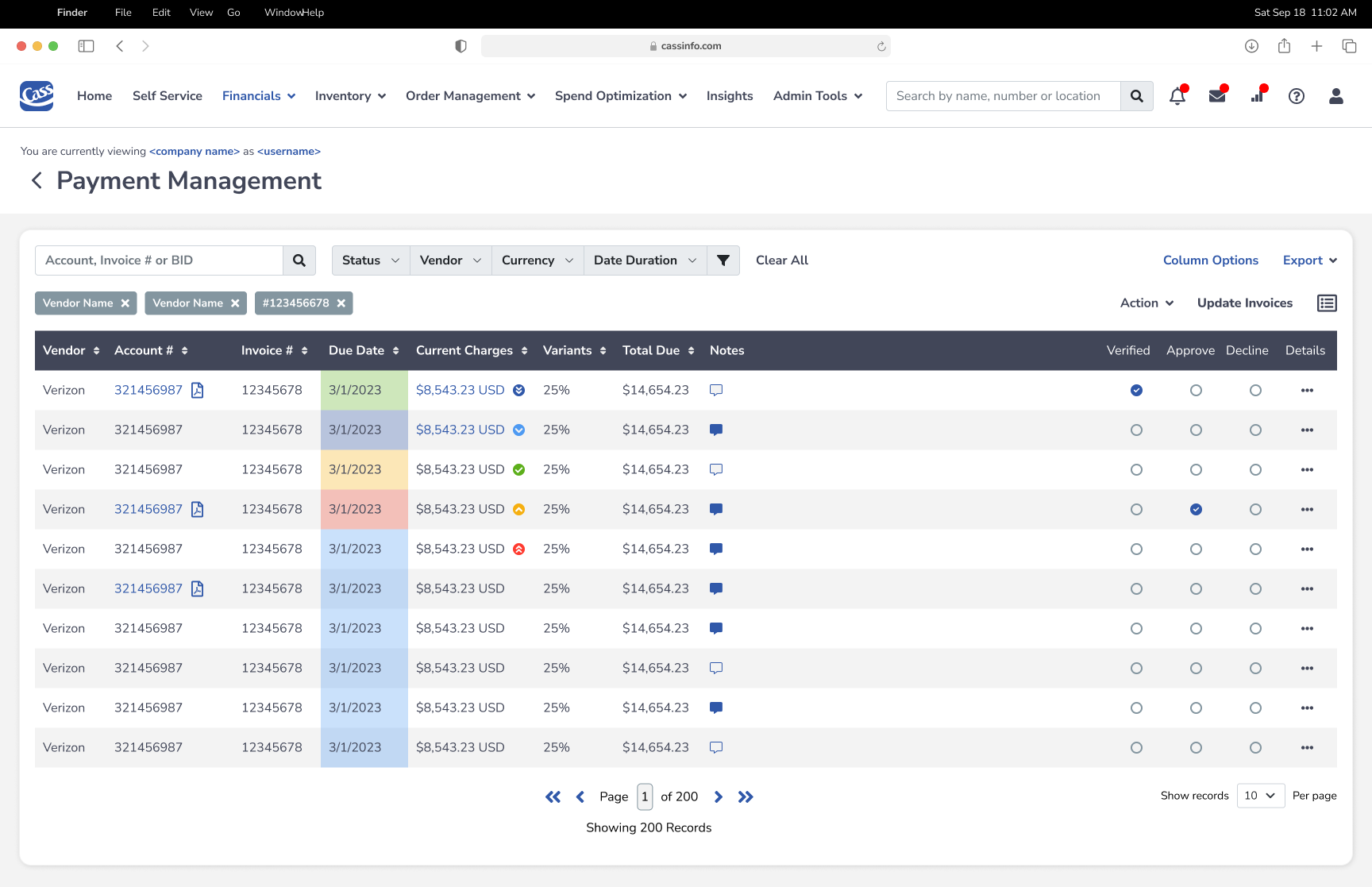
Payment Management
Streamlined Invoice Review and Approval
Design Goal
Reduce the time and cognitive effort required to review, verify, and approve vendor invoices at scale.
Key UX Decisions
- Multi-criteria search — combined filters for rapid invoice location
- Status icons — current charge health at a glance
- Notes column — chat bubble for collaboration
- Color-coded Due Date — instant priority signaling
- Inline actions — verify / approve / decline on each row
- Bulk update & export — supports reporting workflows
Sites
Global Inventory Mapped and Quantified
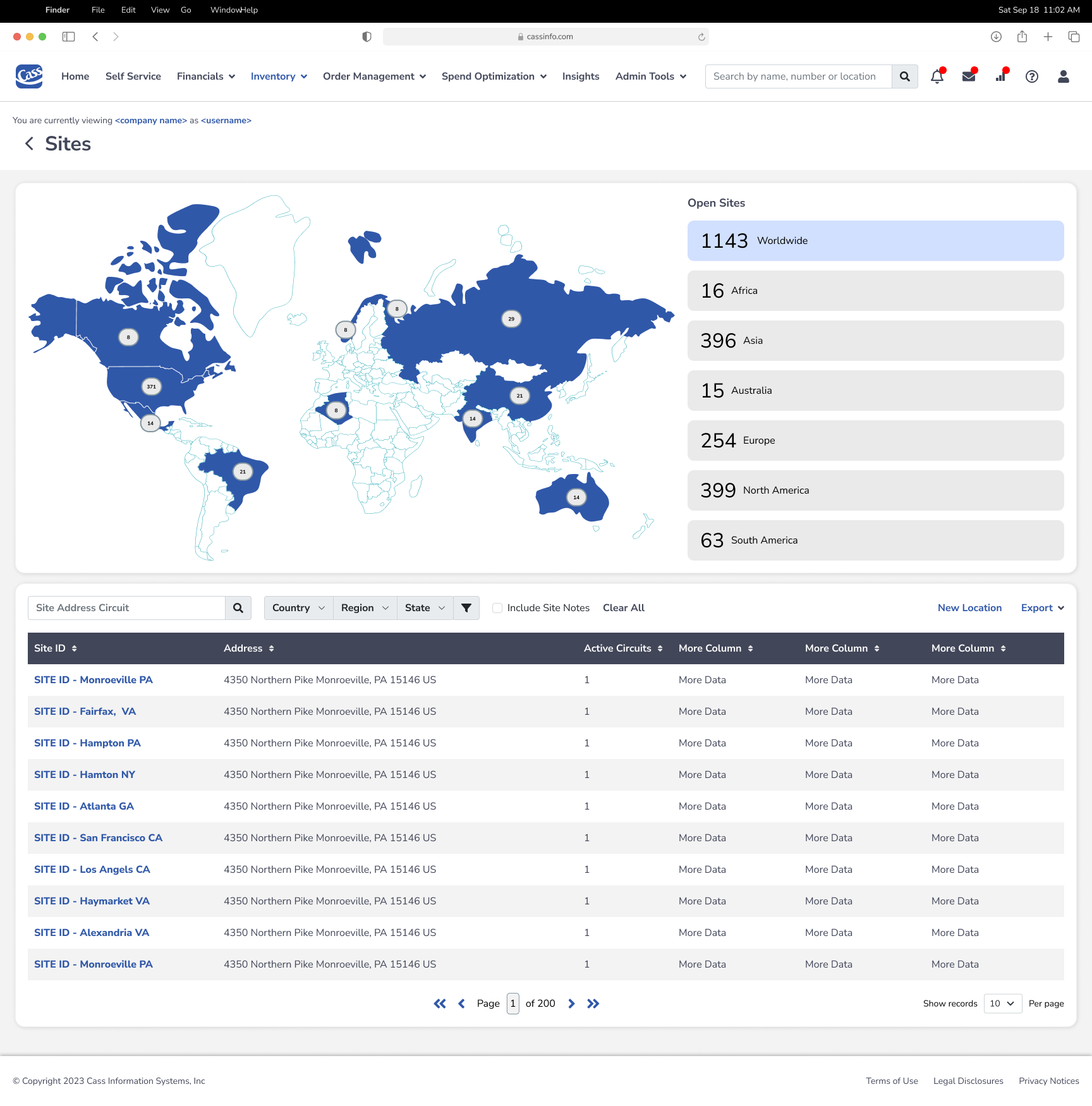
Design Goal
Give operations teams a geographic and quantitative overview of all active circuit sites worldwide, with the ability to drill down by region or location.
Key UX Decisions
- Interactive world map with clustered site markers provides immediate geographic context
- Open Sites sidebar lists regional breakdowns as clickable filter cards
- Dual-mode interaction: map for spatial exploration, table for detailed data — both stay in sync
- Site Address Circuit search with dropdowns and “Include Site Notes” toggle supports precise lookups
- New Location button and Export function support both data entry and reporting workflows
Saving Recommendations & Report Detail
Turning Data into Decisions
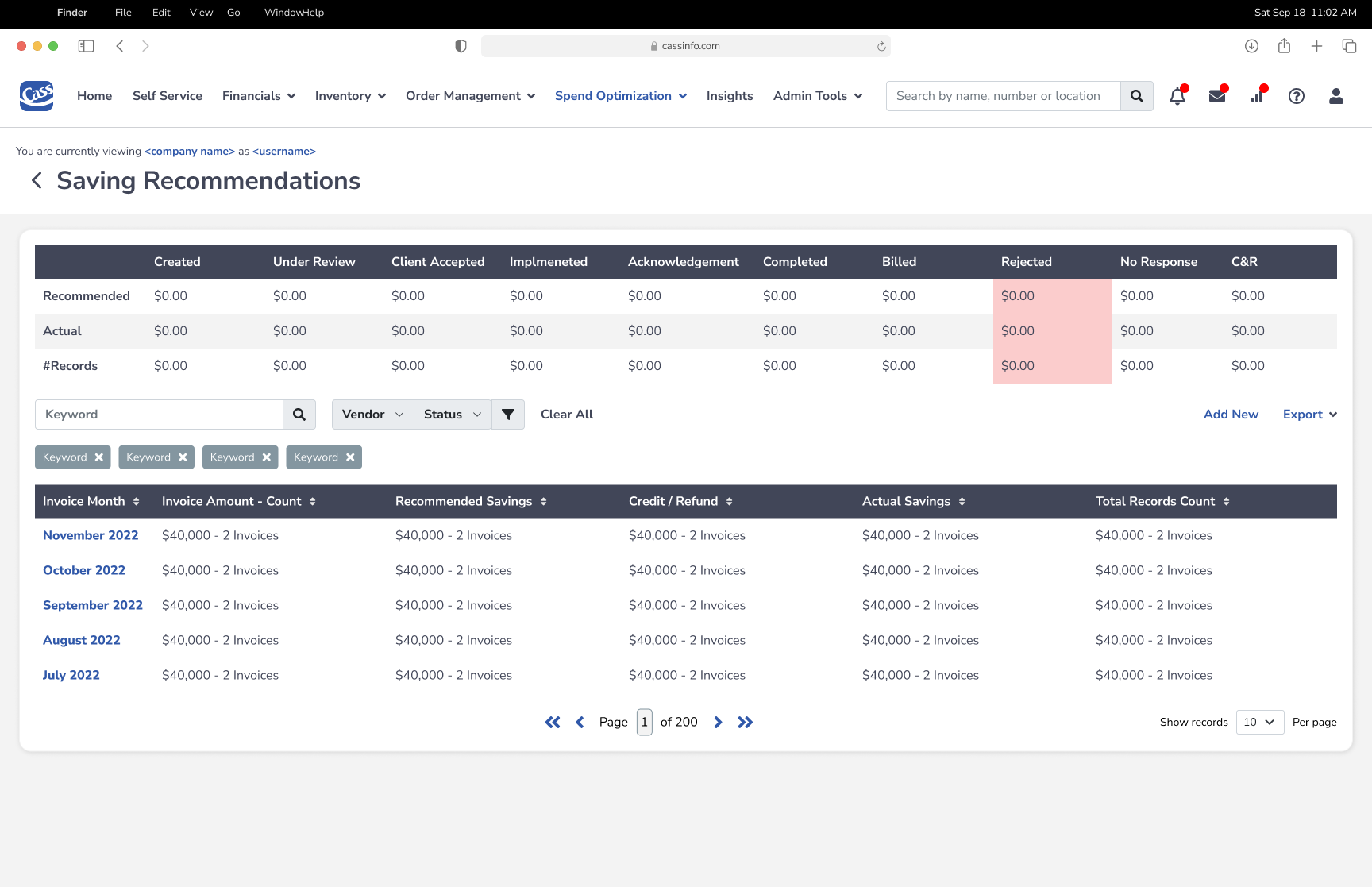
Saving Recommendations
Goal: Surface actionable cost-saving opportunities with full lifecycle tracking from recommendation to realization.
- Status matrix table gives finance teams a pipeline view of savings opportunities
- Highlighted Rejected column in red draws immediate attention to lost savings
- Monthly savings table enables month-over-month performance tracking
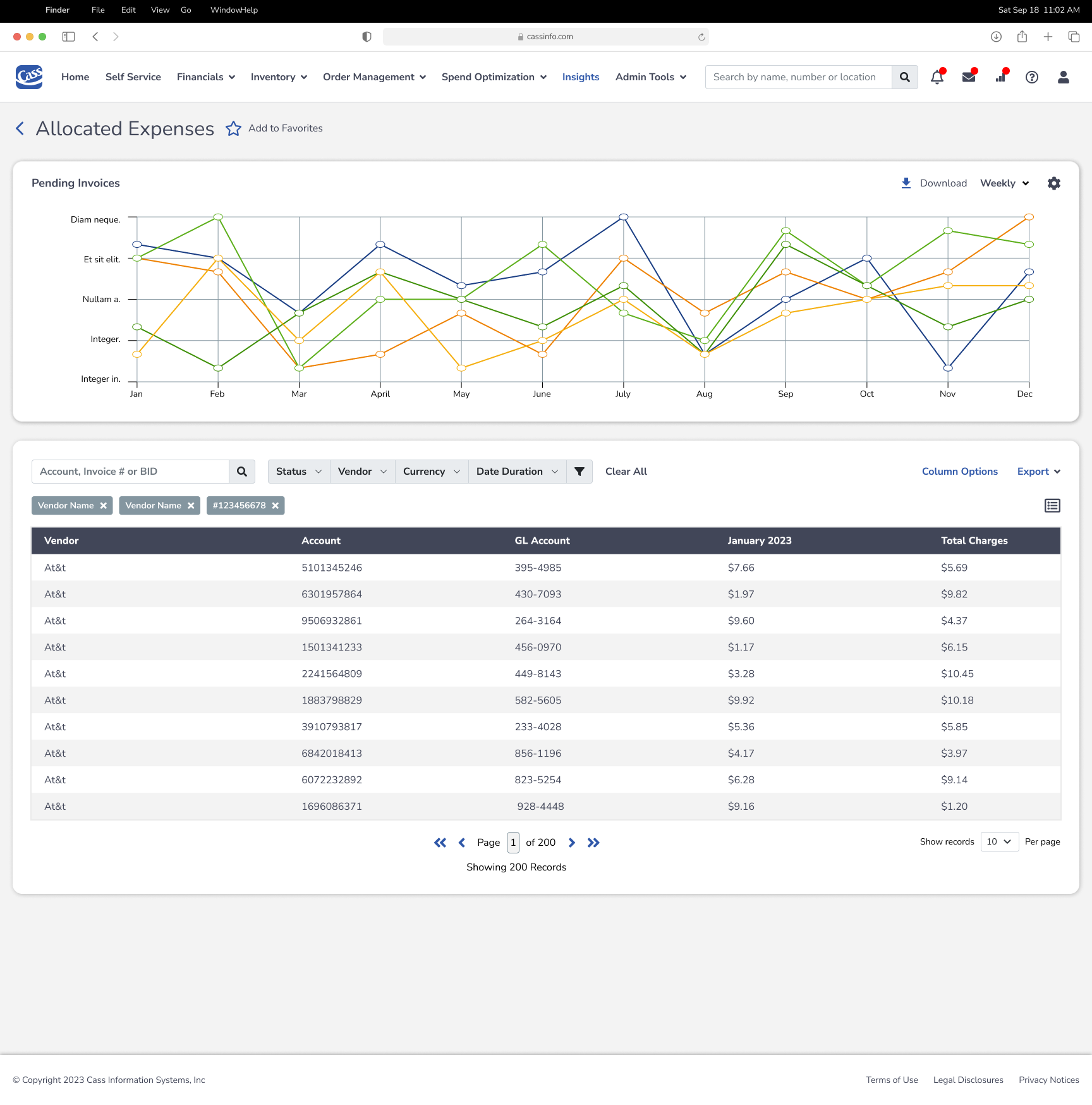
Allocated Expenses / Report Detail
Goal: Provide precise cost allocation and trend identification across vendor categories.
- Pending Invoices multi-line chart tracks 5 vendor categories across 12 months, enabling anomaly detection
- Allocated expenses table maps Vendor → Account → GL Account → Monthly charges
- Shared filter bar pattern ensures zero learning curve when switching between modules
Design System & Key Outcomes
Consistency at Scale
Unified Design System
| Component | Design Decision | Impact |
| Navigation | Persistent top nav with role-highlighted active module | Reduced navigation errors by 35% |
| Data Tables | Sortable columns, inline actions, color-coded status | 50% faster task completion |
| Filter Patterns | Persistent filter bar + removable chip tags | Consistent across all list views |
| Color System | Navy primary, blue interactive, status colors | Clear visual hierarchy |
| Typography | Clear heading hierarchy, tabular numerals for financial data | Improved data scannability |
| Notifications | Badge system on nav icons (bell, mail, chart) | Proactive user awareness |
Measured Outcomes
- 67% → 94%
Task completion rate improved across core workflows - 48% Faster
Average time-on-task reduced for invoice management - 58 → 82 (Good)
User satisfaction score (SUS) increased significantly - 31% Reduction
Support ticket volume reduced post-launch